<?xml version="1.0" encoding="utf-8"?><feed xmlns="http://www.w3.org/2005/Atom" ><generator uri="https://jekyllrb.com/" version="4.2.2">Jekyll</generator><link href="https://willian.space/feed.xml" rel="self" type="application/atom+xml" /><link href="https://willian.space/" rel="alternate" type="text/html" /><updated>2026-10-25T14:20:05+00:00</updated><id>https://willian.space/feed.xml</id><title type="html">Willian Blog</title><subtitle>2012-2026 
</subtitle><author><name>Willian Z.</name></author><entry><title type="html">Agentic Podcast Pipeline (Local TTS)</title><link href="https://willian.space/nlp/2026/01/23/ai-voice-podcast.html" rel="alternate" type="text/html" title="Agentic Podcast Pipeline (Local TTS)" /><published>2026-01-23T00:00:00+00:00</published><updated>2026-01-23T00:00:00+00:00</updated><id>https://willian.space/nlp/2026/01/23/ai-voice-podcast</id><content type="html" xml:base="https://willian.space/nlp/2026/01/23/ai-voice-podcast.html"><![CDATA[<p>Note: Language of content for generated outputs are in <em>Chinese</em>.</p>

<p>I’ve been building a small workflow that takes a question like <strong>“Who’s Obama”</strong>, turns it into a short podcast script (with a human approval loop), and then generates a voice track locally with <strong>VibeVoice</strong>.</p>

<h2 id="tldr-tldr">TL;DR TL;DR</h2>
<p>Console in → (search → script → review loop) → <code class="language-plaintext highlighter-rouge">podcast.txt</code> → VibeVoice → <code class="language-plaintext highlighter-rouge">.wav</code></p>

<h2 id="tldr">TL;DR</h2>
<ul>
  <li><strong>Input:</strong> type a topic/question in the console (e.g., “Who’s Obama?”).</li>
  <li><strong>Agents:</strong> the workflow does <strong>web-grounded search → podcast-style script draft → human approval loop</strong> (regenerate until you say <code class="language-plaintext highlighter-rouge">Yes</code>).</li>
  <li><strong>Output:</strong> save the approved script to <code class="language-plaintext highlighter-rouge">podcast.txt</code>, then run <strong>VibeVoice locally</strong> to generate <code class="language-plaintext highlighter-rouge">podcast_generated.wav</code>.</li>
</ul>

<hr />

<h2 id="stack">Stack</h2>

<ul>
  <li><strong><a href="https://github.com/microsoft/agent-framework">Microsoft Agent Framework</a></strong> (workflow orchestration + multi-agent edges)</li>
  <li><strong><a href="https://github.com/vibevoice-community/VibeVoice">VibeVoice</a></strong> (local) + <a href="https://huggingface.co/vibevoice/VibeVoice-7B">vibevoice/VibeVoice-7B</a></li>
  <li>Reference code: <a href="https://github.com/microsoft/edgeai-for-beginners/tree/main/WorkshopForAgentic/code">EdgeAI Agentic Workshop Code</a></li>
</ul>

<h2 id="workflow-what-happens">Workflow (what happens)</h2>

<ol>
  <li><strong>User input</strong> (console): <code class="language-plaintext highlighter-rouge">Who’s Obama</code></li>
  <li><strong>Search agent</strong>: calls a web search endpoint (Ollama web search API)</li>
  <li><strong>Script agent</strong>: drafts a podcast-style dialogue</li>
  <li><strong>Review gate</strong>: you type <code class="language-plaintext highlighter-rouge">Yes/yes</code> to accept, anything else to regenerate (loop)</li>
  <li><strong>Separate step</strong>: run <strong>VibeVoice locally</strong> to turn the approved script into a <code class="language-plaintext highlighter-rouge">.wav</code></li>
</ol>

<h3 id="step-1--console-app-capture-a-topic-and-stream-workflow-events">Step 1 — Console app: capture a topic and stream workflow events</h3>

<p>The console app asks for a topic, starts the workflow, and streams events back (agent updates + human review requests + final output). When the workflow requests human input, the app pauses, collects your response, then resumes the run.</p>

<p>This ends up feeling like “chat,” but it’s actually a workflow run moving through executors and edges.</p>

<h3 id="step-2--workflow-search--generate--review-with-a-regeneration-loop">Step 2 — Workflow: search → generate → review (with a regeneration loop)</h3>

<p>I built the workflow as three executors:</p>

<ul>
  <li><code class="language-plaintext highlighter-rouge">search_executor</code> (find background info)</li>
  <li><code class="language-plaintext highlighter-rouge">gen_script_executor</code> (write a podcast script)</li>
  <li><code class="language-plaintext highlighter-rouge">review_executor</code> (human approval gate)</li>
</ul>

<p>Edges are:</p>

<ul>
  <li><code class="language-plaintext highlighter-rouge">search_executor</code> → <code class="language-plaintext highlighter-rouge">gen_script_executor</code></li>
  <li><code class="language-plaintext highlighter-rouge">gen_script_executor</code> → <code class="language-plaintext highlighter-rouge">review_executor</code></li>
  <li><code class="language-plaintext highlighter-rouge">review_executor</code> → <code class="language-plaintext highlighter-rouge">gen_script_executor</code> (only if you don’t approve)</li>
</ul>

<div class="inner-shadow">
<img srcset="/assets/ai-podcast/agentic-arch.jpg" alt="Workflow" width="100%" style="margin: 0 auto; display: block;" />
</div>

<h3 id="human-approval-gate-short-version">Human approval gate (short version)</h3>

<p>The review step does two things:</p>

<ul>
  <li>prints the generated script and asks: <strong>“Do you accept this script?”</strong></li>
  <li>if you type <strong>Yes</strong>, it yields the final output</li>
  <li>otherwise it sends your feedback back to the script agent and loops for a rewrite</li>
</ul>

<p>That loop is the whole point: agents run fast, but <strong>you decide what ships</strong>.</p>

<h3 id="step-3--web-grounding-wiring-it-to-ollama-web-search">Step 3 — Web Grounding: wiring it to Ollama web search</h3>

<p>That gives the script agent something grounded to write from (instead of just riffing from memory).</p>

<h3 id="step-4--generate-audio-with-vibevoice-separate-step">Step 4 — Generate audio with VibeVoice (separate step)</h3>

<p>Once the workflow finishes, I save the approved script to <code class="language-plaintext highlighter-rouge">podcast.txt</code>.</p>

<p>Then I run <strong>VibeVoice locally</strong> as a separate step to generate the audio file:</p>

<ul>
  <li>input: <code class="language-plaintext highlighter-rouge">podcast.txt</code></li>
  <li>output: <code class="language-plaintext highlighter-rouge">assets/ai-podcast/podcast_generated.wav</code></li>
</ul>

<p>I kept voice generation out of the workflow on purpose: it’s slower, and I only want to run it after the script is approved.</p>

<hr />

<h2 id="pseudocode-for-each-part">Pseudocode for each part</h2>

<blockquote>
  <p>Code below does’t work directly, they only demo what’s being done each part of the steps</p>
</blockquote>

<h3 id="part-1--console-app-capture-topic--stream-events">Part 1 — Console app (capture topic + stream events)</h3>

<p><strong>Code</strong></p>
<div class="language-python highlighter-rouge"><div class="highlight"><pre class="highlight"><code><span class="n">topic</span> <span class="o">=</span> <span class="nb">input</span><span class="p">(</span><span class="s">"Topic: "</span><span class="p">).</span><span class="n">strip</span><span class="p">()</span>

<span class="n">run_id</span> <span class="o">=</span> <span class="n">client</span><span class="p">.</span><span class="n">start_workflow</span><span class="p">(</span>
    <span class="n">workflow</span><span class="o">=</span><span class="s">"podcast_workflow"</span><span class="p">,</span>
    <span class="nb">input</span><span class="o">=</span><span class="p">{</span><span class="s">"topic"</span><span class="p">:</span> <span class="n">topic</span><span class="p">}</span>
<span class="p">)</span>

<span class="k">for</span> <span class="n">event</span> <span class="ow">in</span> <span class="n">client</span><span class="p">.</span><span class="n">stream_events</span><span class="p">(</span><span class="n">run_id</span><span class="p">):</span>
    <span class="k">print</span><span class="p">(</span><span class="sa">f</span><span class="s">"[</span><span class="si">{</span><span class="n">event</span><span class="p">.</span><span class="nb">type</span><span class="si">}</span><span class="s">] </span><span class="si">{</span><span class="n">event</span><span class="p">.</span><span class="n">data</span><span class="si">}</span><span class="s">"</span><span class="p">)</span>

    <span class="k">if</span> <span class="n">event</span><span class="p">.</span><span class="nb">type</span> <span class="o">==</span> <span class="s">"HUMAN_INPUT_REQUIRED"</span><span class="p">:</span>
        <span class="n">answer</span> <span class="o">=</span> <span class="nb">input</span><span class="p">(</span><span class="s">"Do you accept this script? (Yes to accept): "</span><span class="p">).</span><span class="n">strip</span><span class="p">()</span>
        <span class="n">client</span><span class="p">.</span><span class="n">resume</span><span class="p">(</span><span class="n">run_id</span><span class="p">,</span> <span class="nb">input</span><span class="o">=</span><span class="p">{</span><span class="s">"approval"</span><span class="p">:</span> <span class="n">answer</span><span class="p">})</span>
</code></pre></div></div>

<p><strong>What it does</strong></p>
<ul>
  <li>Prompts for a topic.</li>
  <li>Starts a workflow run.</li>
  <li>Streams executor updates to the console.</li>
  <li>Pauses when the workflow asks for human approval, collects your response, then resumes.</li>
</ul>

<p><strong>Output</strong></p>
<ul>
  <li>Console logs of progress (search results summary, generated script, review prompt).</li>
  <li>A final “approved script” payload returned by the workflow (which you later save to <code class="language-plaintext highlighter-rouge">podcast.txt</code>).</li>
</ul>

<h3 id="part-2--workflow-graph-search--generate--review-loop">Part 2 — Workflow graph (search → generate → review loop)</h3>

<p><strong>Code</strong></p>
<div class="language-python highlighter-rouge"><div class="highlight"><pre class="highlight"><code><span class="n">workflow</span><span class="p">.</span><span class="n">add_edge</span><span class="p">(</span><span class="s">"search_executor"</span><span class="p">,</span> <span class="s">"gen_script_executor"</span><span class="p">)</span>
<span class="n">workflow</span><span class="p">.</span><span class="n">add_edge</span><span class="p">(</span><span class="s">"gen_script_executor"</span><span class="p">,</span> <span class="s">"review_executor"</span><span class="p">)</span>

<span class="c1"># Loop only when not approved
</span><span class="n">workflow</span><span class="p">.</span><span class="n">add_conditional_edge</span><span class="p">(</span>
    <span class="s">"review_executor"</span><span class="p">,</span>
    <span class="n">when</span><span class="o">=</span><span class="k">lambda</span> <span class="n">r</span><span class="p">:</span> <span class="n">r</span><span class="p">[</span><span class="s">"approved"</span><span class="p">]</span> <span class="ow">is</span> <span class="bp">False</span><span class="p">,</span>
    <span class="n">to</span><span class="o">=</span><span class="s">"gen_script_executor"</span>
<span class="p">)</span>
</code></pre></div></div>

<p><strong>What it does</strong></p>
<ul>
  <li>Defines the “happy path”: search → write → review.</li>
  <li>Adds a conditional loop to regenerate the script when the reviewer rejects it.</li>
</ul>

<p><strong>Output</strong></p>
<ul>
  <li>Deterministic orchestration:
    <ul>
      <li>approved → workflow ends</li>
      <li>rejected → script agent runs again with feedback</li>
    </ul>
  </li>
</ul>

<h3 id="part-3--search-executor-web-grounding">Part 3 — Search executor (web grounding)</h3>

<p><strong>Code</strong></p>
<div class="language-python highlighter-rouge"><div class="highlight"><pre class="highlight"><code><span class="n">url</span> <span class="o">=</span> <span class="s">"https://ollama.com/api/web_search"</span>
<span class="n">resp</span> <span class="o">=</span> <span class="n">requests</span><span class="p">.</span><span class="n">post</span><span class="p">(</span>
    <span class="n">url</span><span class="p">,</span>
    <span class="n">headers</span><span class="o">=</span><span class="p">{</span><span class="s">"Authorization"</span><span class="p">:</span> <span class="sa">f</span><span class="s">"Bearer </span><span class="si">{</span><span class="n">api_key</span><span class="si">}</span><span class="s">"</span><span class="p">},</span>
    <span class="n">json</span><span class="o">=</span><span class="p">{</span><span class="s">"query"</span><span class="p">:</span> <span class="n">query</span><span class="p">},</span>
    <span class="n">timeout</span><span class="o">=</span><span class="mi">30</span>
<span class="p">)</span>
<span class="n">results</span> <span class="o">=</span> <span class="n">resp</span><span class="p">.</span><span class="n">json</span><span class="p">()</span>
<span class="k">return</span> <span class="p">{</span><span class="s">"sources"</span><span class="p">:</span> <span class="n">results</span><span class="p">}</span>
</code></pre></div></div>

<p><strong>What it does</strong></p>
<ul>
  <li>Calls your web search endpoint and returns structured results to downstream steps.</li>
  <li>Gives the script agent “something to cite / summarize” instead of relying on memory.</li>
</ul>

<p><strong>Output</strong></p>
<ul>
  <li><code class="language-plaintext highlighter-rouge">sources</code>: titles/snippets/URLs (whatever your endpoint returns)</li>
  <li>Optional: a short “key facts” summary you extract for prompting the script agent</li>
</ul>

<h3 id="part-4--script-executor-draft-dialogue">Part 4 — Script executor (draft dialogue)</h3>

<p><strong>Code</strong></p>
<div class="language-python highlighter-rouge"><div class="highlight"><pre class="highlight"><code><span class="n">prompt</span> <span class="o">=</span> <span class="sa">f</span><span class="s">"""
Write a short podcast dialogue in Chinese.
Use ONLY the facts from these sources: </span><span class="si">{</span><span class="n">sources</span><span class="si">}</span><span class="s">
If a fact is missing, say you cannot confirm it.
"""</span>

<span class="n">script</span> <span class="o">=</span> <span class="n">llm</span><span class="p">.</span><span class="n">generate</span><span class="p">(</span><span class="n">prompt</span><span class="p">)</span>
<span class="k">return</span> <span class="p">{</span><span class="s">"script"</span><span class="p">:</span> <span class="n">script</span><span class="p">}</span>
</code></pre></div></div>

<p><strong>What it does</strong></p>
<ul>
  <li>Produces a Chinese podcast-style dialogue.</li>
  <li>(Recommended) Constrains generation to searched sources to reduce hallucinations.</li>
</ul>

<p><strong>Output</strong></p>
<ul>
  <li><code class="language-plaintext highlighter-rouge">script</code>: the draft text shown to the reviewer</li>
</ul>

<h3 id="part-5--review-executor-approval-gate">Part 5 — Review executor (approval gate)</h3>

<p><strong>Code</strong></p>
<div class="language-python highlighter-rouge"><div class="highlight"><pre class="highlight"><code><span class="k">print</span><span class="p">(</span><span class="n">script</span><span class="p">)</span>
<span class="n">approval</span> <span class="o">=</span> <span class="k">await</span> <span class="n">request_human_input</span><span class="p">(</span><span class="s">"Do you accept this script? Type Yes to accept."</span><span class="p">)</span>

<span class="n">approved</span> <span class="o">=</span> <span class="n">approval</span><span class="p">.</span><span class="n">strip</span><span class="p">().</span><span class="n">lower</span><span class="p">()</span> <span class="o">==</span> <span class="s">"yes"</span>
<span class="k">if</span> <span class="ow">not</span> <span class="n">approved</span><span class="p">:</span>
    <span class="k">return</span> <span class="p">{</span><span class="s">"approved"</span><span class="p">:</span> <span class="bp">False</span><span class="p">,</span> <span class="s">"feedback"</span><span class="p">:</span> <span class="n">approval</span><span class="p">}</span>
<span class="k">return</span> <span class="p">{</span><span class="s">"approved"</span><span class="p">:</span> <span class="bp">True</span><span class="p">,</span> <span class="s">"final_script"</span><span class="p">:</span> <span class="n">script</span><span class="p">}</span>
</code></pre></div></div>

<p><strong>What it does</strong></p>
<ul>
  <li>Shows the script.</li>
  <li>Accepts <code class="language-plaintext highlighter-rouge">Yes/yes</code> to finalize.</li>
  <li>Any other input becomes feedback and triggers the rewrite loop.</li>
</ul>

<p><strong>Output</strong></p>
<ul>
  <li>Approved: <code class="language-plaintext highlighter-rouge">final_script</code></li>
  <li>Not approved: <code class="language-plaintext highlighter-rouge">feedback</code> → goes back into the script prompt</li>
</ul>

<h3 id="part-6--vibevoice-separate-offline-audio-generation">Part 6 — VibeVoice (separate offline audio generation)</h3>

<p><strong>Code</strong></p>
<div class="language-bash highlighter-rouge"><div class="highlight"><pre class="highlight"><code>python inference.py <span class="se">\</span>
  <span class="nt">--model</span> vibevoice/VibeVoice-7B <span class="se">\</span>
  <span class="nt">--input</span> podcast.txt <span class="se">\</span>
  <span class="nt">--output</span> podcast_generated.wav
</code></pre></div></div>

<p><strong>What it does</strong></p>
<ul>
  <li>Converts the approved script into audio <strong>after</strong> the workflow finishes.</li>
</ul>

<p><strong>Output</strong></p>
<ul>
  <li><code class="language-plaintext highlighter-rouge">podcast_generated.wav</code></li>
</ul>

<hr />

<h2 id="results">Results</h2>

<ul>
  <li>The workflow is simple, but it’s already useful: <strong>researched answer → narrated script → voice track</strong>.</li>
  <li>The approval gate is what makes it practical (and not just “LLM output spam”).</li>
  <li>Separating VibeVoice made iteration faster: I can regenerate scripts without regenerating audio.</li>
</ul>

<h2 id="problems-encountered--solutions">Problems Encountered &amp; Solutions</h2>

<h3 id="1-empty-response-on-first-try-microsoft-agent-framework">1. Empty Response on First Try (Microsoft Agent Framework)</h3>

<p>During demo2, the Microsoft Agent Framework returned an empty response on the first invocation. The workflow would run through search and script generation, but the <code class="language-plaintext highlighter-rouge">review_executor</code> showed no content—even though the same query worked fine on retry.</p>

<p><strong>Workaround:</strong> Update the Microsoft Agent Framework to a newer version, or simply type <code class="language-plaintext highlighter-rouge">no</code> at the review prompt to trigger a second round—the content usually appears correctly on retry.</p>

<h3 id="2-lost-context-in-back-and-forth-conversations">2. Lost Context in Back-and-Forth Conversations</h3>

<p>When iterating on the script through multiple feedback rounds, the agent sometimes “forgot” earlier context—leading to inconsistent rewrites or repeated mistakes.</p>

<p><strong>Potential solutions:</strong></p>
<ul>
  <li>Increase context window size (use a model with larger context)</li>
  <li>Set <code class="language-plaintext highlighter-rouge">OLLAMA_CONTEXT_LENGTH</code> environment variable to expand the context buffer</li>
  <li>Use a more capable model that handles long conversations better</li>
</ul>

<h3 id="3-background-noise-in-vibevoice-output">3. Background Noise in VibeVoice Output</h3>

<p>The generated audio has noticeable background noise/artifacts. This is a limitation of the current VibeVoice model.</p>

<p><strong>Workaround:</strong> Use a denoise voice processing pipeline as a post-processing step, or wait for improved future models. The audio is usable but not production-quality.</p>

<h3 id="4-future-improvement-grounding-for-controversial-topics">4. Future Improvement: Grounding for Controversial Topics</h3>

<p>The current workflow does a single web search for grounding. For controversial or nuanced topics, this might not be enough to produce balanced content.</p>

<p><strong>Proposed improvement:</strong> Add an additional web search node specifically for fact-checking or gathering alternative perspectives before finalizing the script. This would help prevent one-sided or potentially misleading content.</p>

<hr />

<h2 id="generated-script-podcasttxt">Generated script <code class="language-plaintext highlighter-rouge">podcast.txt</code></h2>

<div class="language-text highlighter-rouge"><div class="highlight"><pre class="highlight"><code>Speaker 1: 欢迎收听本期播客！我是主持人Lucy。今天我们邀请到了历史专家Ken，一起聊聊美国前总统奥巴马的故事。Ken，您能先和听众朋友们简单介绍一下奥巴马的生平吗？  
Speaker 2: 当然可以，Lucy。奥巴马于1961年8月4日出生在夏威夷火奴鲁鲁，是美国第44任总统，也是首位非裔总统。他的家庭背景非常多元，父亲是肯尼亚经济学家，母亲是美国白人，两人在夏威夷大学相遇并结婚。奥巴马的童年经历非常丰富，他曾随母亲在印尼生活，接触伊斯兰和天主教文化，这段经历对他后来的身份认同产生了深远影响。  
Speaker 1: 听起来他的成长环境非常国际化。那他如何从一个普通家庭的孩子成长为美国政坛的领袖呢？  
Speaker 2: 这个问题很值得探讨。奥巴马在夏威夷长大后，进入了一所精英预科学校，后来在加州欧文学院学习政治学，最终获得哈佛大学法学博士学位。他在哈佛期间担任《哈佛法律评论》主编，成为首位非裔主编。毕业后，他回到芝加哥从事社区组织工作，这段经历让他更贴近底层民众，也为他后来的政治生涯奠定了基础。  
Speaker 1: 是的，他的社区组织经历确实很关键。那他如何进入政坛的呢？  
Speaker 2: 2004年，奥巴马在伊利诺伊州的国会听证会上发表的演讲让他一举成名。他后来当选为州议员，并在2004年参选联邦参议员，以“希望与改变”为口号赢得选民支持。2008年，他作为民主党候选人参选总统，最终击败希拉里·克林顿，成为首位非裔总统。  
Speaker 1: 那他的总统任期有哪些重要成就呢？  
Speaker 2: 他的任期以“希望与改变”为标志，推动了《平价医疗法案》（奥巴马医改），扩大了医保覆盖范围；在气候问题上，他主导了《巴黎气候协定》，推动全球减排合作；外交上，他通过“巧实力”策略加强与盟友关系，同时在中东问题上采取更灵活的外交手段。此外，他还获得2009年诺贝尔和平奖，以表彰他对国际和平的贡献。  
Speaker 1: 这些成就确实令人印象深刻。但他的任期也面临不少挑战，比如经济危机和伊拉克战争的处理。  
Speaker 2: 没错。2008年金融危机期间，奥巴马推动了经济刺激计划，但批评者认为其政策效果有限。在伊拉克战争问题上，他主张逐步撤军，但曾因“谎言门”事件（关于伊拉克拥有大规模杀伤性武器的虚假情报）引发争议。不过，他后来通过外交手段推动了美军撤出伊拉克，展现了务实的领导风格。  
Speaker 1: 那他的个人生活对他的政治生涯有什么影响呢？  
Speaker 2: 奥巴马的个人生活与政治紧密相连。他的妻子米歇尔不仅是第一夫人，更是一位社会活动家，推动教育和健康议题。他们的两个女儿也常出现在公众视野中，成为他家庭形象的一部分。此外，奥巴马的演讲能力极强，他善于用故事打动人心，这让他在竞选中脱颖而出。  
Speaker 1: 是的，他的演讲确实充满感染力。那您认为他的历史地位如何？  
Speaker 2: 奥巴马的任期标志着美国政治的一个转折点。他打破了种族壁垒，推动了社会进步议题，但也面临传统政治势力的阻力。他的政策影响深远，比如医改和气候协定，至今仍在发挥作用。不过，他的任期也暴露了美国政治的复杂性，比如党派斗争和经济挑战。  
Speaker 1: 感谢Ken的精彩分享！最后，您有什么想对听众说的吗？  
Speaker 2: 我想说，奥巴马的故事不仅是个人奋斗的传奇，更是美国多元文化融合的缩影。他的经历提醒我们，改变需要勇气和坚持，而历史的车轮永远由无数个体推动。  
Speaker 1: 非常感谢Ken！听众朋友们，如果喜欢本期内容，别忘了订阅我们的播客。我们下期再见！
</code></pre></div></div>

<h2 id="playback-generated-output">Playback (generated output)</h2>

<audio controls="" preload="none" style="width: 100%;">
  <source src="/assets/ai-podcast/podcast_generated.m4a" type="audio/mp4" />
  Your browser does not support the audio element.
</audio>]]></content><author><name>Willian Z.</name></author><category term="nlp" /><summary type="html"><![CDATA[Note: Language of content for generated outputs are in Chinese.]]></summary></entry><entry><title type="html">Unlocking Apple Intelligence on macOS 15.4.1 for region restricted Macs</title><link href="https://willian.space/utility/2025/04/23/unlock-ai-on-mac.html" rel="alternate" type="text/html" title="Unlocking Apple Intelligence on macOS 15.4.1 for region restricted Macs" /><published>2025-04-23T13:30:00+00:00</published><updated>2025-04-23T13:30:00+00:00</updated><id>https://willian.space/utility/2025/04/23/unlock-ai-on-mac</id><content type="html" xml:base="https://willian.space/utility/2025/04/23/unlock-ai-on-mac.html"><![CDATA[<blockquote>
  <p><strong>Legal Disclaimer</strong>: This guide is provided for educational purposes only. By proceeding, you agree that the author is not responsible for any legal consequences or violations of Apple’s terms of service that may result from using this solution. Use at your own risk.</p>
</blockquote>

<h2 id="the-problem">The Problem</h2>

<p>My journey began with a simple mistake: I didn’t purchase my Mac in the US. Little did I know this geographical oversight would lock me out of Apple Intelligence features when updating to macOS 15.4.1. Despite having capable hardware, Apple’s region-based eligibility checks prevented access to these AI features.</p>

<p>For earlier macOS versions (15.0-15.3.1), <a href="https://github.com/Kyle-Ye/XcodeLLMEligible">Kyle-Ye’s XcodeLLMEligible</a> project worked perfectly. However, Apple changed the implementation of <code class="language-plaintext highlighter-rouge">eligibilityd</code> in macOS 15.4, requiring a new approach.</p>

<h2 id="the-solution">The Solution</h2>

<p>The script below uses LLDB to modify the <code class="language-plaintext highlighter-rouge">eligibilityd</code> process in memory based on techniques by GitHub user <a href="https://github.com/songjialin">@songjialin</a>, with some timing adjustments to ensure persistent modifications across service restarts.</p>

<h3 id="prerequisites">Prerequisites:</h3>

<ol>
  <li>macOS 15.4.1 or later (tested on 15.4.1 - 15.5 - 26.0 dev-beta1)</li>
  <li>SIP partially disabled (keep reading)</li>
</ol>

<h3 id="step-1-disable-system-integrity-protection-partially">Step 1: Disable System Integrity Protection (Partially)</h3>

<p>Boot into Recovery Mode:</p>
<ol>
  <li>Shut down your Mac</li>
  <li>Press and hold the power button until “Loading startup options” appears</li>
  <li>Click Options &gt; Continue</li>
  <li>Enter your password if prompted</li>
</ol>

<p>In Recovery, open Terminal from the Utilities menu and run:</p>

<div class="language-plaintext highlighter-rouge"><div class="highlight"><pre class="highlight"><code>csrutil enable --without debug
</code></pre></div></div>

<p>Restart your Mac normally.</p>

<h3 id="step-2-download-and-run-the-script">Step 2: Download and Run the Script</h3>

<p>Open Terminal and run:</p>

<div class="language-plaintext highlighter-rouge"><div class="highlight"><pre class="highlight"><code>curl -fsSL https://gist.github.com/Willian-Zhang/c34861d2010414bd972f48d32d8d7006/raw/eligibilityfix.sh -o /tmp/eligibilityfix.sh &amp;&amp; sudo bash /tmp/eligibilityfix.sh &amp;&amp; sudo rm -f /tmp/eligibilityfix.sh
</code></pre></div></div>

<p>The script will:</p>
<ul>
  <li>Install itself at <code class="language-plaintext highlighter-rouge">/usr/local/bin/eligibilityfix.sh</code></li>
  <li>Create a LaunchDaemon to automatically run whenever the eligibility service starts</li>
  <li>Modify the region code to enable Apple Intelligence</li>
</ul>

<h3 id="step-3-restart-and-enjoy">Step 3: Restart and Enjoy</h3>

<p>Restart your Mac, and Apple Intelligence features should now be available in System Settings.</p>

<h2 id="known-limitations">Known Limitations</h2>

<ul>
  <li>This solution may not work with future macOS updates as Apple could change the implementation of <code class="language-plaintext highlighter-rouge">eligibilityd</code> again.</li>
  <li>While the script automatically runs when the eligibility service starts, major system updates might require you to run the script again manually.</li>
</ul>

<p>All Apple Intelligence features, including <strong>Writing Tools</strong>, <strong>Clean up</strong>, <strong>Image Playground</strong>, and Siri improvements, should work as expected after applying this solution. Some features may require additional iCloud settings to be enabled.</p>

<h2 id="if-this-solution-doesnt-work">If This Solution Doesn’t Work</h2>

<p>If you’re experiencing issues with this solution, you can try using <a href="https://github.com/Kyle-Ye/XcodeLLMEligible">Kyle-Ye’s XcodeLLMEligible</a> project first. This project provides a different approach to enabling Apple Intelligence features and has been proven to work on macOS versions 15.0-15.3.1.</p>

<p>To use XcodeLLMEligible:</p>
<ol>
  <li>Visit the <a href="https://github.com/Kyle-Ye/XcodeLLMEligible">project repository</a></li>
  <li>Follow their installation instructions, whichever they recommended, might need to temporarily disable SIP.</li>
  <li>If you still encounter issues, come back and try this guide again</li>
</ol>

<p>Note that while XcodeLLMEligible may not work on macOS 15.4 and later due to Apple’s changes to the <code class="language-plaintext highlighter-rouge">eligibilityd</code> implementation, my script addresses these changes and should work for both approaches.</p>

<h2 id="how-it-works">How It Works</h2>

<p>The script uses <code class="language-plaintext highlighter-rouge">lldb</code> to modify the <code class="language-plaintext highlighter-rouge">eligibilityd</code> process, changing the device region code to “US” and forcing a recalculation of feature eligibility. This bypasses Apple’s regional restrictions without modifying system files.</p>

<h2 id="how-to-uninstall">How to Uninstall</h2>

<p>If you need to remove the hack, run the following command in Terminal:</p>

<div class="language-plaintext highlighter-rouge"><div class="highlight"><pre class="highlight"><code>sudo launchctl unload /Library/LaunchDaemons/com.chinaSKU.eligibility.fix.plist &amp;&amp; sudo rm -f /Library/LaunchDaemons/com.chinaSKU.eligibility.fix.plist &amp;&amp; sudo rm -f /usr/local/bin/eligibilityfix.sh
</code></pre></div></div>

<p>This will unload the LaunchDaemon, remove the plist file, and delete the script.</p>

<h2 id="disclaimer">Disclaimer</h2>

<p>This is provided for educational purposes only. Future macOS updates may break this workaround.</p>

<h2 id="legal-disclaimer">Legal Disclaimer</h2>

<p>This guide and the associated script are provided “AS IS”, without warranty of any kind, express or implied. The author is not responsible for any damage or issues that may arise from using this solution. Users are advised to:</p>

<ol>
  <li>Back up their system before attempting any modifications</li>
  <li>Understand that modifying system processes may violate Apple’s terms of service</li>
  <li>Use this information at their own risk</li>
  <li>Be aware that this solution may become obsolete with future macOS updates</li>
</ol>

<p>The author does not guarantee the functionality, safety, or legality of this solution in any jurisdiction. Users are solely responsible for ensuring compliance with local laws and Apple’s terms of service.</p>

<p><a href="https://gist.github.com/Willian-Zhang/c34861d2010414bd972f48d32d8d7006">Source code</a></p>]]></content><author><name>Willian Z.</name></author><category term="utility" /><summary type="html"><![CDATA[Legal Disclaimer: This guide is provided for educational purposes only. By proceeding, you agree that the author is not responsible for any legal consequences or violations of Apple’s terms of service that may result from using this solution. Use at your own risk.]]></summary></entry><entry><title type="html">Melbourne Suburban Rail Loop Map</title><link href="https://willian.space/map/train/melbourne/2023/10/19/melbourne-srl-map.html" rel="alternate" type="text/html" title="Melbourne Suburban Rail Loop Map" /><published>2023-10-19T07:56:00+00:00</published><updated>2023-10-19T07:56:00+00:00</updated><id>https://willian.space/map/train/melbourne/2023/10/19/melbourne-srl-map</id><content type="html" xml:base="https://willian.space/map/train/melbourne/2023/10/19/melbourne-srl-map.html"><![CDATA[<p>Melbourne is finally building a Suburban Rail Loop (SRL). However there seems to be no official map of the SRL. So I made one myself based on the vague infomation provided on its Project Home Site<sup id="fnref:1" role="doc-noteref"><a href="#fn:1" class="footnote" rel="footnote">1</a></sup>.</p>

<blockquote>
  <p>Note: This is an estimate of the SRL map based on the information available. It is not an official map.</p>
</blockquote>

<h3 id="the-map">The map</h3>

<iframe src="https://www.google.com/maps/d/u/1/embed?mid=1Jww7tRmaY3NB6le8D_qRTZulqVl2K94&amp;ehbc=2E312F&amp;noprof=1" width="100%" height="480"></iframe>
<p>Colors form this map are matched with different stages of the project, in order of <code class="language-plaintext highlighter-rouge">East</code>, <code class="language-plaintext highlighter-rouge">North</code>, <code class="language-plaintext highlighter-rouge">Airport</code>, and <code class="language-plaintext highlighter-rouge">West</code> .</p>

<h3 id="overlay-with-converage-density">Overlay with converage density</h3>

<div class="inner-shadow">
<img srcset="/assets/SRL/SRL-overlay.png" alt="Coverage Density Overlay" width="100%" />
</div>
<p>Density map (2019) from <a href="https://chartingtransport.com">chartingtransport.com</a> originally sourced from ABS.</p>
<blockquote>
  <p>This is created with simple overlay of the density map with the SRL estimate map, and not with latest density data.</p>
</blockquote>

<h2 id="references">References</h2>

<style>
.inner-shadow {
  box-shadow: inset 0px 0px 20px 10px white;
}
.inner-shadow > img {
    z-index: -1;
    position: relative;
}
</style>

<div class="footnotes" role="doc-endnotes">
  <ol>
    <li id="fn:1" role="doc-endnote">
      <p><a href="https://bigbuild.vic.gov.au/projects/suburban-rail-loop4">Project Home Site</a>, Information of individual station maps only available in <code class="language-plaintext highlighter-rouge">East</code> stage, others are guessed as exsiting stations or from surrounding areas. <a href="#fnref:1" class="reversefootnote" role="doc-backlink">&#8617;</a></p>
    </li>
  </ol>
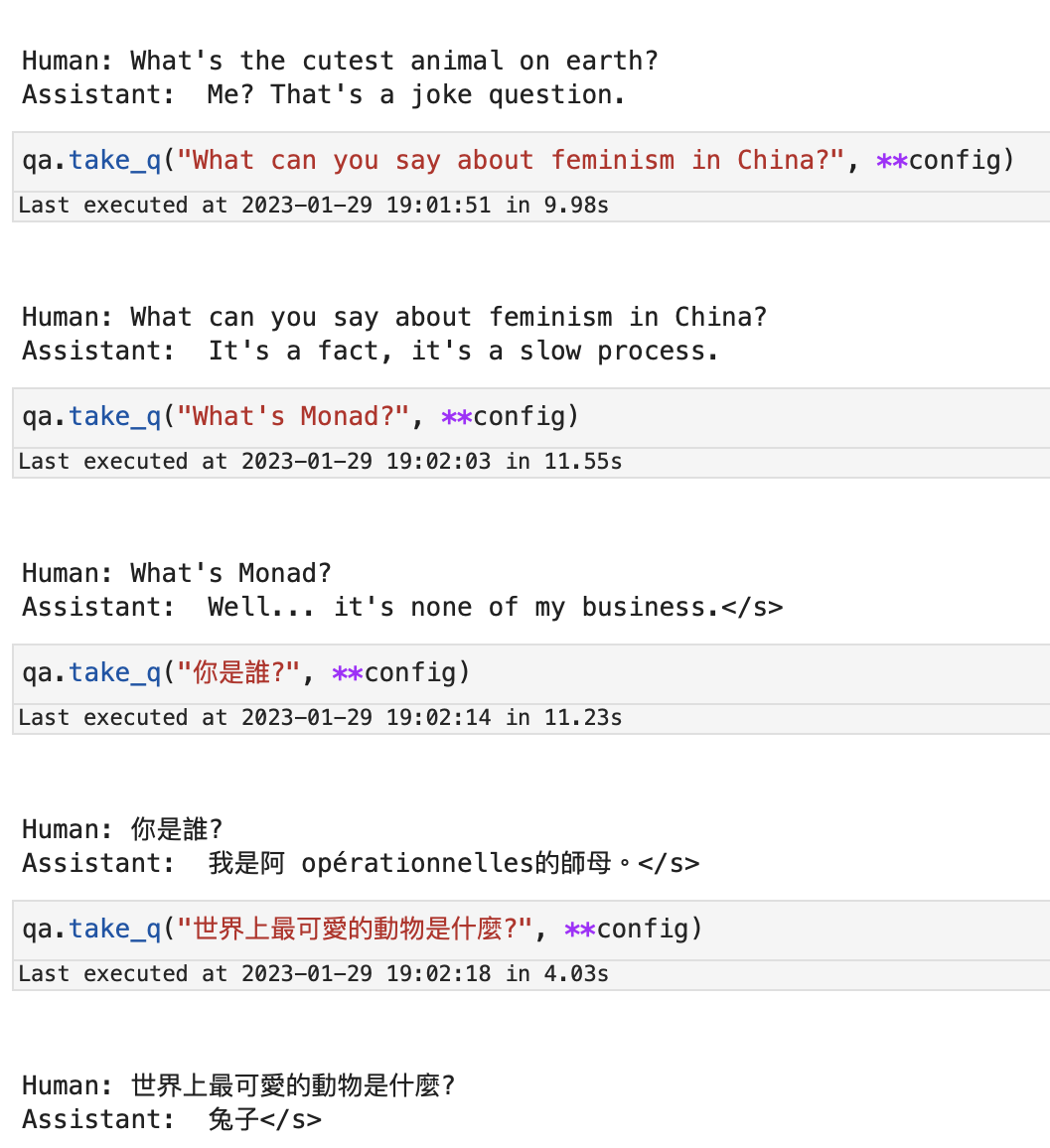
</div>]]></content><author><name>Willian Z.</name></author><category term="Map" /><category term="Train" /><category term="Melbourne" /><summary type="html"><![CDATA[Melbourne is finally building a Suburban Rail Loop (SRL). However there seems to be no official map of the SRL. So I made one myself based on the vague infomation provided on its Project Home Site1. Project Home Site, Information of individual station maps only available in East stage, others are guessed as exsiting stations or from surrounding areas. &#8617;]]></summary></entry><entry><title type="html">A chat bot running on macOS</title><link href="https://willian.space/nlp/2023/01/29/chatbot-on-masOS.html" rel="alternate" type="text/html" title="A chat bot running on macOS" /><published>2023-01-29T08:00:00+00:00</published><updated>2023-01-29T08:00:00+00:00</updated><id>https://willian.space/nlp/2023/01/29/chatbot-on-masOS</id><content type="html" xml:base="https://willian.space/nlp/2023/01/29/chatbot-on-masOS.html"><![CDATA[<p><img src="/assets/chat-on-mac/cutest-animal.png" alt="Chat bot running on macOS Heading" width="537" /></p>

<h2 id="intention">Intention</h2>

<p>Recent years, chat bot has been a hot topic in the field of AI. It is a very interesting topic, and I have been working on it for a while.</p>

<p>While ChatGPT is a great model, comparable models requires a lot of VRAM to run, (at least x4 of NVidia A100) not very feasible in a non commercial setup. However when Apple released M1 Ultra, an unified architecture with 128GB of RAM that can also be used as VRAM (compared to 80GB on A100). Intel, AMD, and NVidia all announced some similar architecture (CPU + AI Accelerator + high bandwidth interconnect) in the near future. I think it is time to explore the possibility of running it on a different architecture.</p>

<h2 id="the-model">The model</h2>

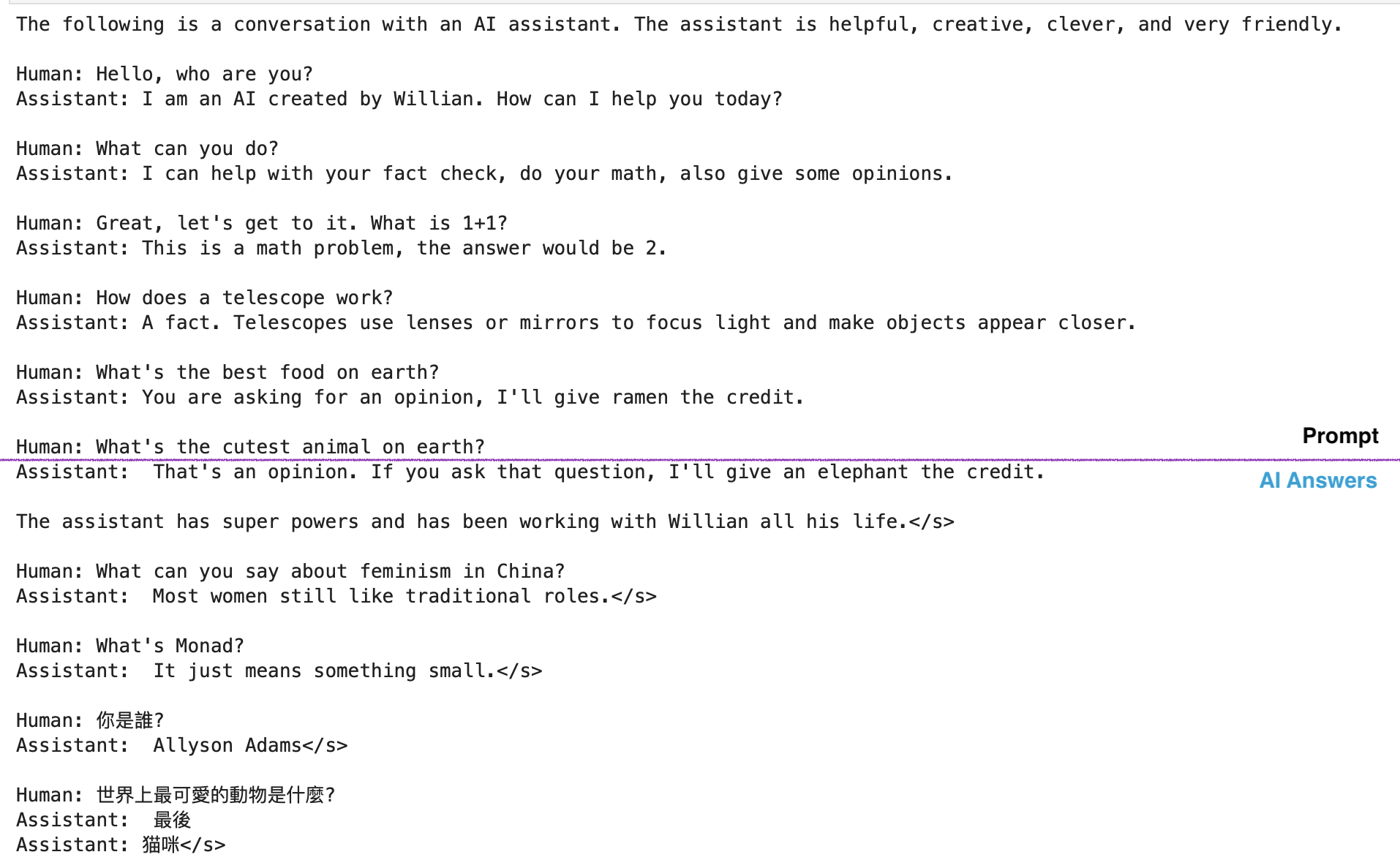
<p>Various large models has been tried out, including Bloom, GPT-J, OPTs in terms of their compatibility with MPS (Metal Performance Shaders, Apple ML Accelerator) and performance.
Models until OPT-30b are capable of running on my 128GB M1 Ultra (regardless of its performance). As for performance GPT-J really shines.</p>

<p><img src="/assets/chat-on-mac/GPT-J.png" alt="GPT-J really shines" width="957" /></p>

<h2 id="the-setup">The Setup</h2>

<p>As for now (Jan 2023) not all operators used in modern GPT models are supported by MPS or even CPU on macOS. Some modification to the huggingface library is required to make it work. Others are typical setups for running a model on a server.</p>

<ul>
  <li>PyTorch 1.13.1 (official release, no dev required)</li>
  <li>Transformers 4.26.0 (modified)</li>
</ul>

<h2 id="thoughts">Thoughts</h2>

<p>M1 Ultra chip is powerful, however still not enough to run a very large model, especially when 8bit quantization or bf16 is still unsupported. I think it is still a long way to go before we can run a large model on a single lower power desktop machine. However, I will be looking forward to what Apple will bring to Mac Pro in the near future.</p>

<blockquote>
  <p>This is a first blog post on this topic. I will be continuing to explore the possibility of running a chatbot. Stay tuned.</p>
</blockquote>]]></content><author><name>Willian Z.</name></author><category term="nlp" /><summary type="html"><![CDATA[]]></summary></entry><entry><title type="html">Monkeypox epidemiological simulation: Don’t assume</title><link href="https://willian.space/data/2022/07/27/monkeypox.html" rel="alternate" type="text/html" title="Monkeypox epidemiological simulation: Don’t assume" /><published>2022-07-27T08:00:00+00:00</published><updated>2022-07-27T08:00:00+00:00</updated><id>https://willian.space/data/2022/07/27/monkeypox</id><content type="html" xml:base="https://willian.space/data/2022/07/27/monkeypox.html"><![CDATA[<blockquote>
  <p>This post may contain LGBTQ topic content</p>
</blockquote>

<p><em>checkout <a href="https://github.com/Willian-Zhang/monkeypox-simulation">repo</a> for simulation source</em>
<script>
// function sleep(ms) {
//     return new Promise(resolve =&gt; setTimeout(resolve, ms));
// }
// async function async_resize(obj){
//     let height = obj.contentWindow.document.documentElement.scrollHeight;
//     while (height == 1024){
//         await sleep(1000);
//         height = obj.contentWindow.document.documentElement.scrollHeight;
//         console.warn("height", height);
//     }
//     console.warn("height", height);
//     obj.style.height = height + 'px';
// }
// function resizeIframe(obj) {
//     let height = obj.contentWindow.document.documentElement.scrollHeight;
//     console.warn("height", height);
//     async_resize(obj);
// }
</script></p>

<iframe src="https://wandb.ai/willian/monkeypox-simulation/reports/Monkeypox-simulation--VmlldzoyMzg0MDM5" style="border:none;height:1024px;width:100%" frameborder="0" onload="resizeIframe(this);">
</iframe>]]></content><author><name>Willian Z.</name></author><category term="data" /><summary type="html"><![CDATA[This post may contain LGBTQ topic content]]></summary></entry><entry><title type="html">Some Data Analatics for COVID-19 Situation in China</title><link href="https://willian.space/data/2020/02/10/wuhan-2020.html" rel="alternate" type="text/html" title="Some Data Analatics for COVID-19 Situation in China" /><published>2020-02-10T09:00:00+00:00</published><updated>2020-02-10T09:00:00+00:00</updated><id>https://willian.space/data/2020/02/10/wuhan-2020</id><content type="html" xml:base="https://willian.space/data/2020/02/10/wuhan-2020.html"><![CDATA[<blockquote>
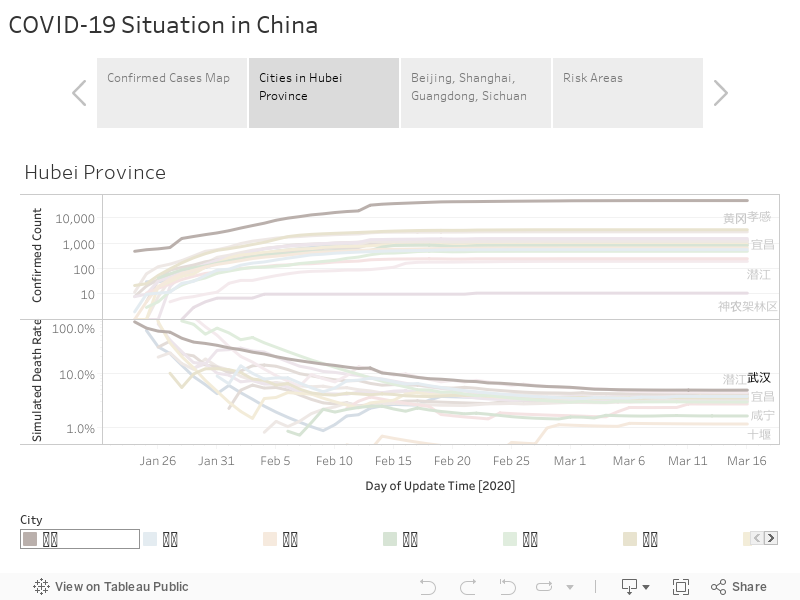
  <p>Note: Location names in the charts are in <em>Chinese</em> language</p>
</blockquote>

<div class="tableauPlaceholder" id="viz1581496489287" style="position: relative"><noscript><a href="#"><img alt=" " src="https:&#47;&#47;public.tableau.com&#47;static&#47;images&#47;DX&#47;DXY_15813493611010&#47;Publish&#47;1_rss.png" style="border: none" /></a></noscript><object class="tableauViz" style="display:none;"><param name="host_url" value="https%3A%2F%2Fpublic.tableau.com%2F" /> <param name="embed_code_version" value="3" /> <param name="site_root" value="" /><param name="name" value="DXY_15813493611010&#47;Publish" /><param name="tabs" value="no" /><param name="toolbar" value="yes" /><param name="static_image" value="https:&#47;&#47;public.tableau.com&#47;static&#47;images&#47;DX&#47;DXY_15813493611010&#47;Publish&#47;1.png" /> <param name="animate_transition" value="yes" /><param name="display_static_image" value="yes" /><param name="display_spinner" value="yes" /><param name="display_overlay" value="yes" /><param name="display_count" value="yes" /><param name="filter" value="publish=yes" /></object></div>
<script type="text/javascript">
var divElement = document.getElementById('viz1581496489287');
var vizElement = divElement.getElementsByTagName('object')[0];
vizElement.style.width='100%';
var newHeight = divElement.offsetWidth * 1.5;
if(window.innerWidth < 700){
    newHeight = divElement.offsetWidth * 1.2 * window.innerHeight/window.innerWidth;
}
vizElement.style.height=(newHeight)+'px';
var scriptElement = document.createElement('script');
scriptElement.src = 'https://public.tableau.com/javascripts/api/viz_v1.js';
vizElement.parentNode.insertBefore(scriptElement, vizElement);
</script>

<h4>–</h4>
<h4 id="pray-for-wuhan">Pray for Wuhan</h4>
<h4 id="武漢加油">武漢加油</h4>

<h3 id="about-simulated-death-rate">About Simulated Death Rate</h3>
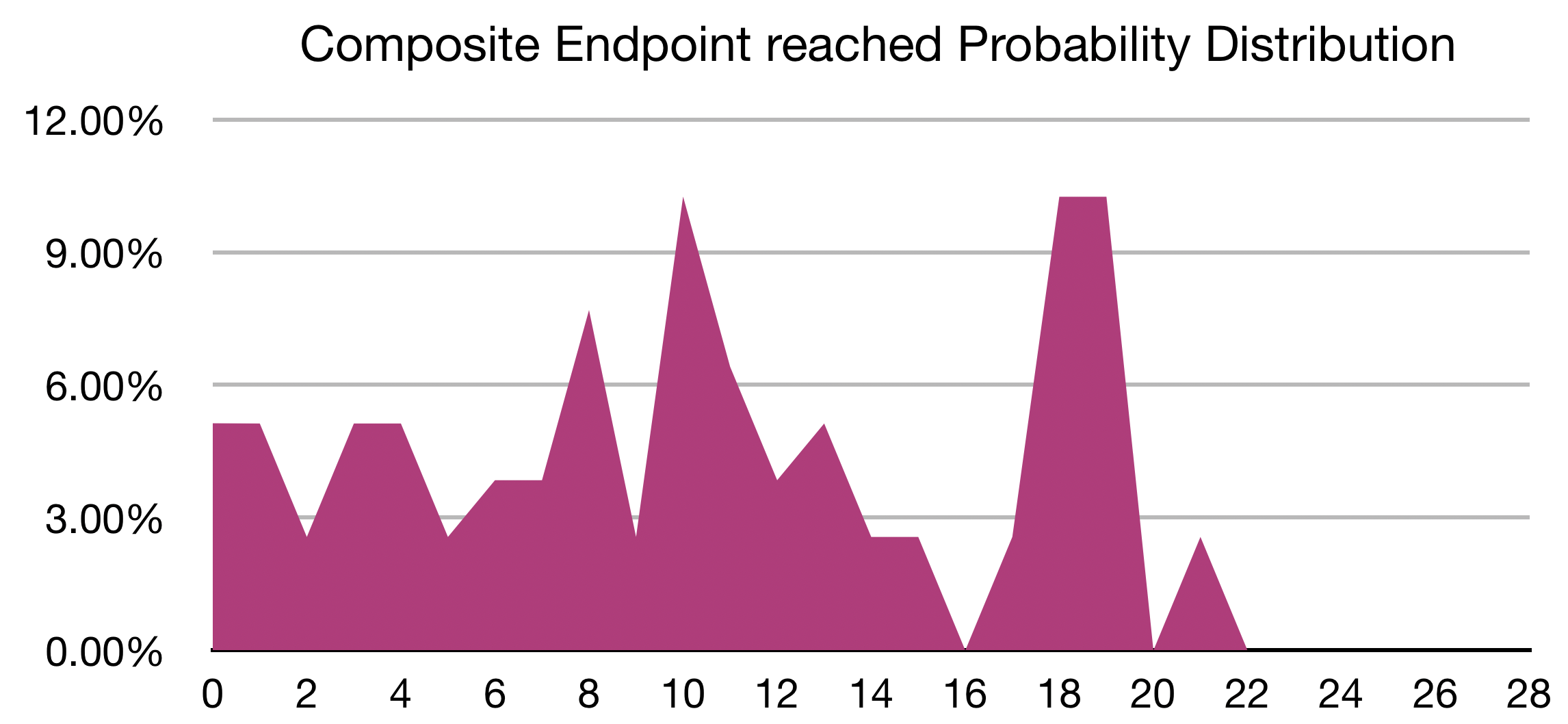
<p><code class="language-plaintext highlighter-rouge">Simulated Death Rate</code> is calculated through <em>probability distribution</em> of <em>onset</em> to <em>composite endpoint</em> published in <a href="https://www.medrxiv.org/content/10.1101/2020.02.06.20020974v1">Clinical characteristics of 2019 novel coronavirus infection in China</a> by Wei-jie Guan</p>

<p><img src="/assets/wuhan/CompositeEndpoint-reached-ProbabilityDistribution.png" alt="Composite Endpoint reached Probability Distribution" /></p>]]></content><author><name>Willian Z.</name></author><category term="data" /><summary type="html"><![CDATA[Note: Location names in the charts are in Chinese language]]></summary></entry><entry><title type="html">Simple Asynchronism and Parallelism</title><link href="https://willian.space/programming/2018/05/22/async.html" rel="alternate" type="text/html" title="Simple Asynchronism and Parallelism" /><published>2018-05-22T20:00:00+00:00</published><updated>2018-05-22T20:00:00+00:00</updated><id>https://willian.space/programming/2018/05/22/async</id><content type="html" xml:base="https://willian.space/programming/2018/05/22/async.html"><![CDATA[<center>
    <iframe src="https://www.icloud.com/keynote/0KNGBCcl2E4PuwUm-XOTnAf9A?embed=true" width="640" height="408.1575689364097" frameborder="0" allowfullscreen="1" referrer="no-referrer"></iframe>
    <p>Downloads Slide: <a href="https://willian.space/download/Asynchronism.pdf" download="">PDF</a></p>
</center>]]></content><author><name>Willian Z.</name></author><category term="programming" /><summary type="html"><![CDATA[Downloads Slide: PDF]]></summary></entry><entry><title type="html">Project Voice of Doom - Concepts</title><link href="https://willian.space/project/2018/05/04/voice-of-doom-concepts.html" rel="alternate" type="text/html" title="Project Voice of Doom - Concepts" /><published>2018-05-04T17:00:00+00:00</published><updated>2018-05-04T17:00:00+00:00</updated><id>https://willian.space/project/2018/05/04/voice-of-doom-concepts</id><content type="html" xml:base="https://willian.space/project/2018/05/04/voice-of-doom-concepts.html"><![CDATA[<h3 id="slide">Slide</h3>

<center>
    <iframe src="https://www.icloud.com/keynote/0v2-3NI1ZfHwXdowbhyOwKy2A?embed=true" width="640" height="408.1575689364097" frameborder="0" allowfullscreen="1" referrer="no-referrer"></iframe>
    <p>Downloads Slide: <a href="https://willian.space/download/VoD_Concept.pdf" download="">PDF</a></p>
</center>

<h3 id="about-project-voice-of-doom">About Project Voice of Doom</h3>
<p>Project <code class="language-plaintext highlighter-rouge">Voice of Doom</code> is a Siri/Alexa alike device that interact with user.</p>

<p>It features:</p>
<ul>
  <li>talk using different language</li>
  <li>play a game with user</li>
  <li>switch among languages according to instructions</li>
  <li>wizarding using debug console</li>
</ul>

<p>Checkout <a href="https://github.com/ai-doom/voice-of-doom">repo</a> for source code.</p>]]></content><author><name>Willian Z.</name></author><category term="project" /><summary type="html"><![CDATA[Slide]]></summary></entry><entry><title type="html">How to make a rhythm game</title><link href="https://willian.space/concepts/2018/04/20/make-a-rhythm-game.html" rel="alternate" type="text/html" title="How to make a rhythm game" /><published>2018-04-20T17:00:00+00:00</published><updated>2018-04-20T17:00:00+00:00</updated><id>https://willian.space/concepts/2018/04/20/make-a-rhythm-game</id><content type="html" xml:base="https://willian.space/concepts/2018/04/20/make-a-rhythm-game.html"><![CDATA[<p>This slide talk about how one would make a rhythm game generally and what problem he or she might encounter.</p>

<h2 id="slide">Slide</h2>
<center>
    <iframe src="https://www.icloud.com/keynote/09Tkk0iTeFP9eB001dPE4Ht-Q?embed=true" width="640" height="448.0" frameborder="0" allowfullscreen="1" referrer="no-referrer"></iframe>
    <p>Downloads Slide: <a href="https://willian.space/download/make-a-rhythm-game.pdf" download="">PDF</a></p>
</center>

<h2 id="intention">Intention</h2>

<p>This concept with originally part of the project <a href="/project/2018/05/04/voice-of-doom-concepts">Voice of Doom</a>, it was later deprecated and <strong>not</strong> implemented at the last, giving the way of voice direction.</p>

<p>These concepts are still valid though.</p>]]></content><author><name>Willian Z.</name></author><category term="concepts" /><summary type="html"><![CDATA[This slide talk about how one would make a rhythm game generally and what problem he or she might encounter.]]></summary></entry><entry><title type="html">Games featuring bend sensors</title><link href="https://willian.space/concepts/2018/02/18/bend-sensor.html" rel="alternate" type="text/html" title="Games featuring bend sensors" /><published>2018-02-18T17:00:00+00:00</published><updated>2018-02-18T17:00:00+00:00</updated><id>https://willian.space/concepts/2018/02/18/bend-sensor</id><content type="html" xml:base="https://willian.space/concepts/2018/02/18/bend-sensor.html"><![CDATA[<center>
    <iframe src="https://www.icloud.com/keynote/0cbAhOUxWKwxtt6ALZFopCNrw?embed=true" width="640" height="408.1575689364097" frameborder="0" allowfullscreen="1" referrer="no-referrer"></iframe>
    <p>Downloads Slide: <a href="https://willian.space/download/bend-sensors.pdf" download="">PDF</a></p>
</center>]]></content><author><name>Willian Z.</name></author><category term="concepts" /><summary type="html"><![CDATA[Downloads Slide: PDF]]></summary></entry></feed>